29 October 2011

Bushes

One feature of the game to help the burglar hide is to jump into nearby bushes. This idea, originating from the film "To Catch A Thief", would cause the bush to move, making it visible for second or so after doing the action. To achieve this at a basic stage we decided to just make a cube that would wobble when the player runs into it.

After some research on how we would get the animation of the cube to play as vertice animation in UDK, it became apparent that the new real way to do this with the demise of Actor X, was to use "Morph Targets" (Blend Shapes in Maya). Before doing this stage, we decided to stick with what we know, and what the bushes would actually be most likely animated with in the end; bones. Placing one central bone on the ground, and another at the top to make the top face wobble, I exported using the FBX format, and imported to UDK as a skeletal mesh. The timeline animation made UDK create an "AnimSet" ready for me.
Placing the cube into the world with a nice rudimentary shader in a rudimentary world, I used Kismet to make the animation play when trigger boxes were touched. We put 4 in, doing the same thing, so that moving around inside the bush (cube) would still causing more animations. Furthermore, we wanted it so that when walked into it would play random sound effects, not the same one over and over again. Research showed this to be relatively simple, using a "Random" node in Kismet, linked to 4 different sounds, which all link to the animation.

Further development of this idea when we come to do it properly could include the possibility to use even more trigger volumes to play a specific animation depending on what side of the bush you walk into, while still playing a random sound from its provided choices.

27 October 2011

Balloons

One of the "trap" weapons in the game was to set up a Chinese Lantern that is full of explosive gas. The lantern would hover a set height above the ground, held down by a very small weight on the floor, and attacked to a thin piece of string. If a player were to walk into this thin string and didn't see it to avoid it, the string would pull the lantern down and pull the string out of it, causing a reaction within to make a small explosion over the unsuspecting player.

To do this, I modelled a very simple lantern from our rough initial ideas of how it could look, along with a thin piece of string with a bone structure within. The bone structure allows the string to deform, while keeping the lantern and the small weight on the floor in tact.
When brought in, I created a "Physics Asset" for the lantern, which allowed it to "rag-doll" around when clicked and / or dragged. Then a "Physical Material" was created which was allied to the asset which gave it its gravitational information as well as other such attributes like wind resistance, density, and so on.
This is how I made it float like a lantern, and interact as such.
With this testing we began to think that this idea may not be appropriate because it would be so easy to see. We deduced that players would most likely always see it unless it was used behind a doorway for instance, but even then players would catch-on, and look before the run through doorways. A later project update post will say whether or not we keep this.

25 October 2011

Hiding in wardrobes

In order to allow the Burglars to hide from the guards, we wanted them to be able to hide in various places around the level. We decided that Wardrobes would be a cool place to hide.

I decided to experiment with the idea and how it would be achievable in the UDk


A simple flow diagram explaining the system

I then took this a step further and tried to implement it into a simple test level in UDK. Initially I had trouble working out how to get it to work without using the 'Teleporter' class found in the content browser. I had a look in my UDK reference book 'Mastering Unreal Technology' and realised that there was a Kismet node for this. This required that i have two triggers at each end. One 'trigger volume' to call the on screen comment and also to act as the teleport target, and the other 'Trigger' class to call the command to teleport the player.


I then linked it up in kismet


Further development of this will be required to make sure that only the burglars are able to use these hiding places. I have already begun looking at more complex kismet sequences and how the use of 'team specific triggers' will be useful.

We also want guards to be able to search in the wardrobes to see if the burglar is in them. If this is the case, the burglar will loose.

I managed a simple version of this, where, if a player triggered a third trigger placed at the wardrobe, the player would be killed. I used a delay node to simulate this as I am yet to get  working multiplayer game.

24 October 2011

Packaging a game

Packaging a game is actually a very easy step. It seems that as long as you stick to UDK's file system, it will go without a hitch.

Naming the game for installation

Packaging
After this is done, you are given a .exe file named accordingly which you can then install to other computers and play the game. Ours is called 'UDKInstall-CBG.exe'


Installing the game

...
After this is done, just click the button in the start bar, and you are good to go!

The first alpha release of 'Cat Burglars'
I thought it might be a good idea to try out the new Apple Mac support for UDK games too and again, was a very simple procedure.

Hooray, we're multiplatform :)

23 October 2011

Creating a proper file system and adding custom classes

It is our aim to be able to package installable .exe demos of the game in various stages of development in order to be able to distribute various alpha releases between the group for testing. This may also include selected testers outside of the group to get proper feedback from people unassociated with the project. As our game is primarily multiplayer, this should give us the chance to test it in a multiplayer test situation.

In order to do this, along with making our workflow in UDK efficient I have set up a proper project directory within the UDK folders.

I have also created custom classes and game types so UDK can recognize out custom game from the others. This will also mean that it can be packaged as a unique game.

Here are my custom Classes within our project folder located in the development\Src directory

This is our initial project layout folder within the standard UDKGame directory

This is our Maps directory with our various test maps (note the naming convention 'CBG')

Re-Building the scripts in UnrealFrontend so UDK understands my classes
With this set up, I can now look into how to package a game up into an executable installer for distribution.

Blank Slate :)

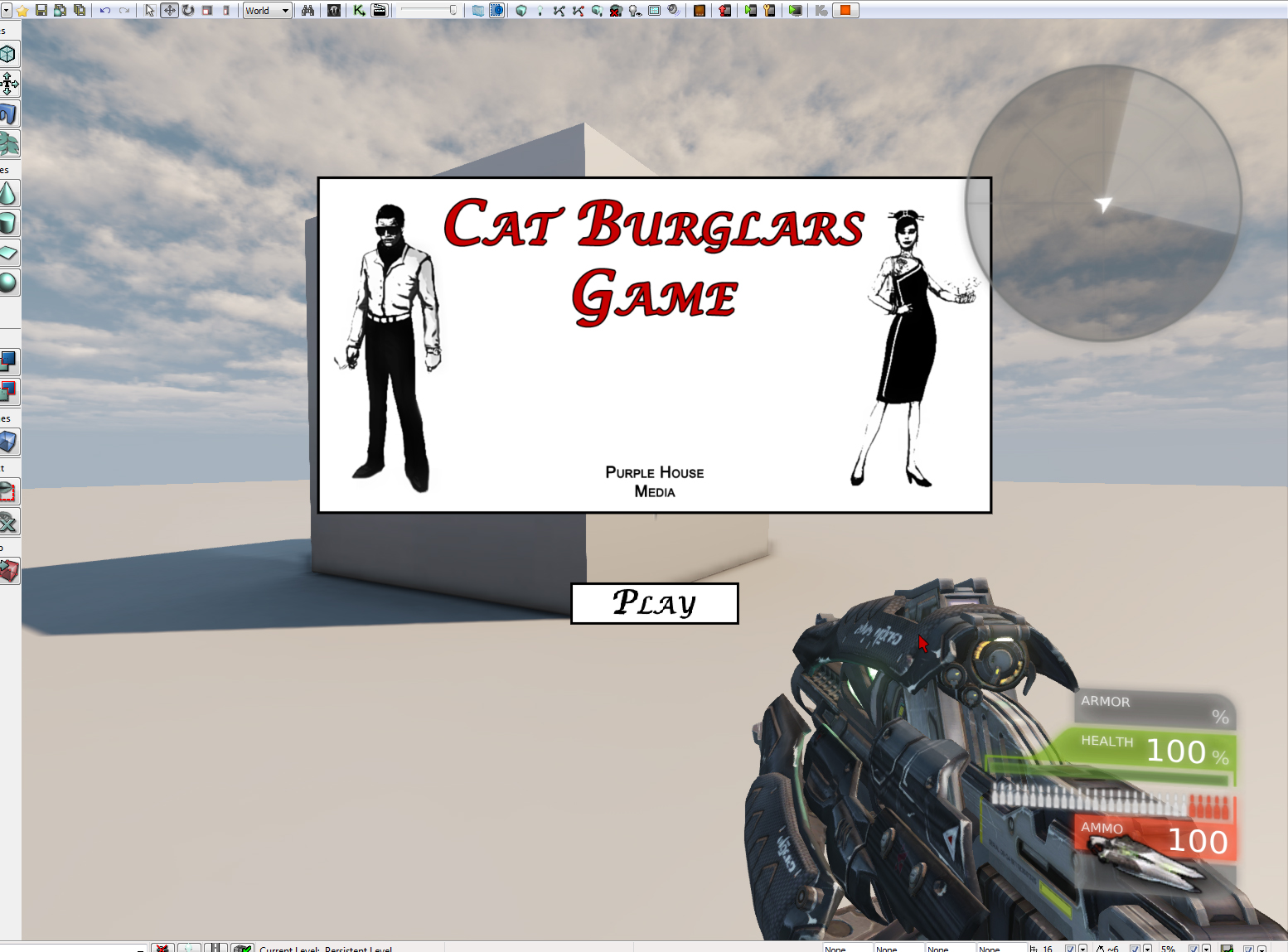
Finally we have a "blank slate" to work from. The User Interface now functions more or less to the extent we would want for our demo, although it still is very basic and rough in design.
Here is the end result of working on the custom user interface, created using Photoshop, Flash and Kismet in UDK. In terms of functionality, the play button launches the "DM-Deck" map in UDK. The Options button jumps to a new window where all functionality is off, forcing the player to play as we make it for now at least, and can only press the "Back" button to return here.
I am now confident i know how to get the custom user interface to do almost anything i can think of, as i already know Flash and some ActionScript, and camera controls seem to work in UDK now. Indirectly, this has also given us an insight on how we would make a custom HUD (although we don't plan to have a big HUD anyway, maybe just a map which this doesn't help with).

22 October 2011

Attempt at a Blank Slate

We've been looking into the next stages of development for our game now. Further conceptions are still undergoing primarily from Artur, while we try to get the game off the ground in UDK. A task I felt like looking into and getting up that we wanted this year, is having a custom User Interface working when you start the game. This in itself also requires the game to have been started from the actual UDK Game, not the Editor as the Editor does not allow a player to change maps, which is actually how the User Interface would work.
This is what I got so far from reading and watching a few tutorials online. With this, I can clearly see now how we would go about adding a custom HUD, but its still a bit less clear how to make this the main menu screen as intended; this will require more research. 

The interface was created in Adobe Flash CS4 using ActionScript 2.0. ActionScript 3.0 is apparently
  not supported yet, but this was not a problem for what I want to do for this. This test contains 1 working button to load a different map when clicked, as well as a custom cursor which can be seen in the top part of the gun here (red arrow).

21 October 2011

The Map Layout

We knew where we wanted to set the level and so we thought the best way to emulate how the land should look was to find a suitable area on google maps and use it as a base for our level to be designed around.

To do this we took a screenshot of the area and painted the existing houses out in order to give ourselves a blank canvas.

We then took a top-down 3d render of a building concept that Artur had been working on and used it to plan out where the building would sit on the land.


We then planned out the garden area based on research of the type of villa we wanted to emulate and created an authentic but original design, tailored for the type of gameplay we wanted to create.

19 October 2011

In conjunction with the past research into 1950's high-life fashion, development of the standard "civilian" characters begun. As this process started, more research was done on very specific areas such as shoes, hand-hags and peruses.


These both are created from fashion found in various sources, and mixed together to create new ideas while keeping in touch with the time and style required.


17 October 2011

Cat Burglars


‘Cat Burglars’ (working title) immerses the player into the glamorous world of 1950s high life. Influenced by Hollywood cinema of the time, the game is set in various luxurious settings across the world, at exclusive events, only frequented by the highest profile guests.

The game centers on an elite group of thieves, notorious for their ability to steal the most valuable items without leaving a whisker of evidence. Known by their victims as ‘The Cats’, they earn their riches by raiding dinner parties, openings, balls, casinos and any other event where money and jewels will be present. By living the highlife whilst covering up their secretive ulterior motives, they remain in the highest social circles, trusted by those who feed the cats without even knowing it.

In an attempt to quell the surge in burglaries, private security has been brought in to guard the properties of the rich and famous. Yet the cats still hunt, waiting for the purrfect moment to pounce.

Cary Grant in 'To Catch a Thief' (1955)

16 October 2011

Character Concepts

Concept art for the game is pretty much an opened case. We all agreed for the visual style of the final product, however we are still working over the details.


Characters:


We have started with initial sketches and silhouettes of three main characters. Yakuza girl, High class Russian businessman( most probably mafia member), and British gentleman. Names of those characters are yet uncertain.


Russian mafia member


We were concidering to make this character as hudge broad shoulder muscle man who carries little russian dolls with knock out gas. Hudge man and little dolls would have been great contrast and surprise for the opposite player. We were looking for typical Russian face, with criminal accent. Finally we have decided to make him an elderly man with the sense of class.

13 October 2011

Mood-boards

We needed to really start processing the research we were gathering more efficiently. What we were doing before was to get some images from a book or website or film, then just get an idea, then jot it down on paper or digitally somewhere. However as we started to get so much research into all different things, we began to organise Dropbox more efficiently for us to find what we want when we want it, as well as starting to create "Mood-boards".
Mood-boards are created by us all sitting down together and looking at what research we have that best-shows what we are aiming for overall. These images are then put into one large, screen-resolution effective canvas, and arranged in a clear manner. We can then access these mood-boards whenever we want on the appropriate subjects we want to find ideas and / or information, instead of flicking through folders and folders of research.
You can see how hair styles and make-up are nicely shown here in one image; perfect for reference for female character design.
We can also use mood-boards to show a more specific theme or the work of just one artist at a time, to say "We want to create more ideas closer to that of Cristobal Balenciaga" for example.

10 October 2011

Research of the People

 Male 1950's Fashion
Female 1950's Fashion

These are some samples of male and female 1950's fashion research we conducted to see what we need to be thinking of in order to design characters appropriately. The goal behind this initial research point is to start collecting a large resource of fashion icons during the 1950's, and by doing so, start to combine and alter them with other research found along the way. This is how we will try to make more unique characters for the players, and how we can make NPC "drones" to populate the level with.

These are some samples of vehicles that could be seen outside the villa the level is set in. The player would be start outside and have to sneak in most probably, so what the player would find outside is important for us to know also.

 Nice idea for the view outside the villa
A look of what we want to try and achieve architectural-wise

These last two images show some samples of what we are looking at in terms of level design. We want to set the demo in a villa, maybe in Britain or maybe the south of France or Monaco; defiantly European because we feel the architecture in this part of the world suits the style and setting we are going for overall.

Note that in the top image we are looking more at the surroundings and the possibility of setting the villa on a hill. We were not looking so much at that type of villa. The bottom image is far closer to what we have in mind in terms of the building itself.
Blog up and running.
Ricky Thomas (P104135)
Will Mulligan (P109387)
Artur Mirosz (P114046)